
MongoDB Basics for Students / Training
What You'll Learn

Start at the Beginning: Define and categorize databases by exploring the features that make them what they are.
Database Fundamentals
What is a Database?
Data is at the heart of all modern applications. It is used for making decisions, preserving history, and recording transactions across the internet. Think about an application that you use. It could be a mobile application on your phone or a web application like Twitch. What you interact with is called the front-end of the application. The buttons you click to initiate an action, the search bars you type into, the results that get presented to you, all of these are part of the front-end. All front-end components rely on database software, or potentially even multiple databases, to store and serve up information when called upon in what’s referred to as the back-end of the application.

Data is more prevalent than ever with an increasing number of smart devices, readily available internet connections, and a better understanding of the value that data can provide. Recent advancements in Artificial Intelligence and Large Language Models have only increased the need to store data. This increase in data has led to more options for storing and accessing that data. While most people are aware of the term database, many would struggle to say what characteristics define a database. Can you describe what makes a database a database?
The concept is simple - a database is a place to store data. More accurately, it is an organized collection of structured or unstructured information stored on a machine or in the cloud. One of the key differentiators from a flat file (e.g. a spreadsheet) is that a database includes a Database Management System (or DBMS) to handle user requests and data protocols.
A DBMS is software that interacts with end users, applications, and the database to capture and analyze data. It provides a systematic way to perform essential interactions with the database, like reading and writing data. This is often referred to as CRUD operations, which stands for Create, Retrieve, Update, and Delete. This software is also responsible for key factors like managing the hardware running the database, managing users and their permissions, maintaining security and data integrity, as well as creating backup processes for recovery in the event of database failure.
Now that we have a sense of what a database is, we can take a look at different types of databases.
Types of Databases
There are many different types of databases available, each with strengths and weaknesses. One popular way to categorize databases is to separate them into SQL and NoSQL categories. SQL refers to the Structured Query Language, which is used to query (search for data) “relational” databases. NoSQL refers to Not Only SQL and is sometimes called a “non-relational” database. While the terms relational and non-relational are popular, we’ll stick with SQL and NoSQL.
SQL databases were created in the 1970s and are still widely used today. They separate data into tables that have rows and columns, resembling spreadsheets. In these databases, a row (or record) contains data with columns (or fields) representing categories of information. We’ll talk more about how these databases work later, but for now, we’ll look at NoSQL databases and some of the sub-categories within.
NoSQL is an umbrella term that refers to alternative systems to the traditional SQL databases. NoSQL databases organize data using a different structure than the rows and columns.
Click the buttons below to explore four of the most common types of NoSQL Databases!
Key Value Databases
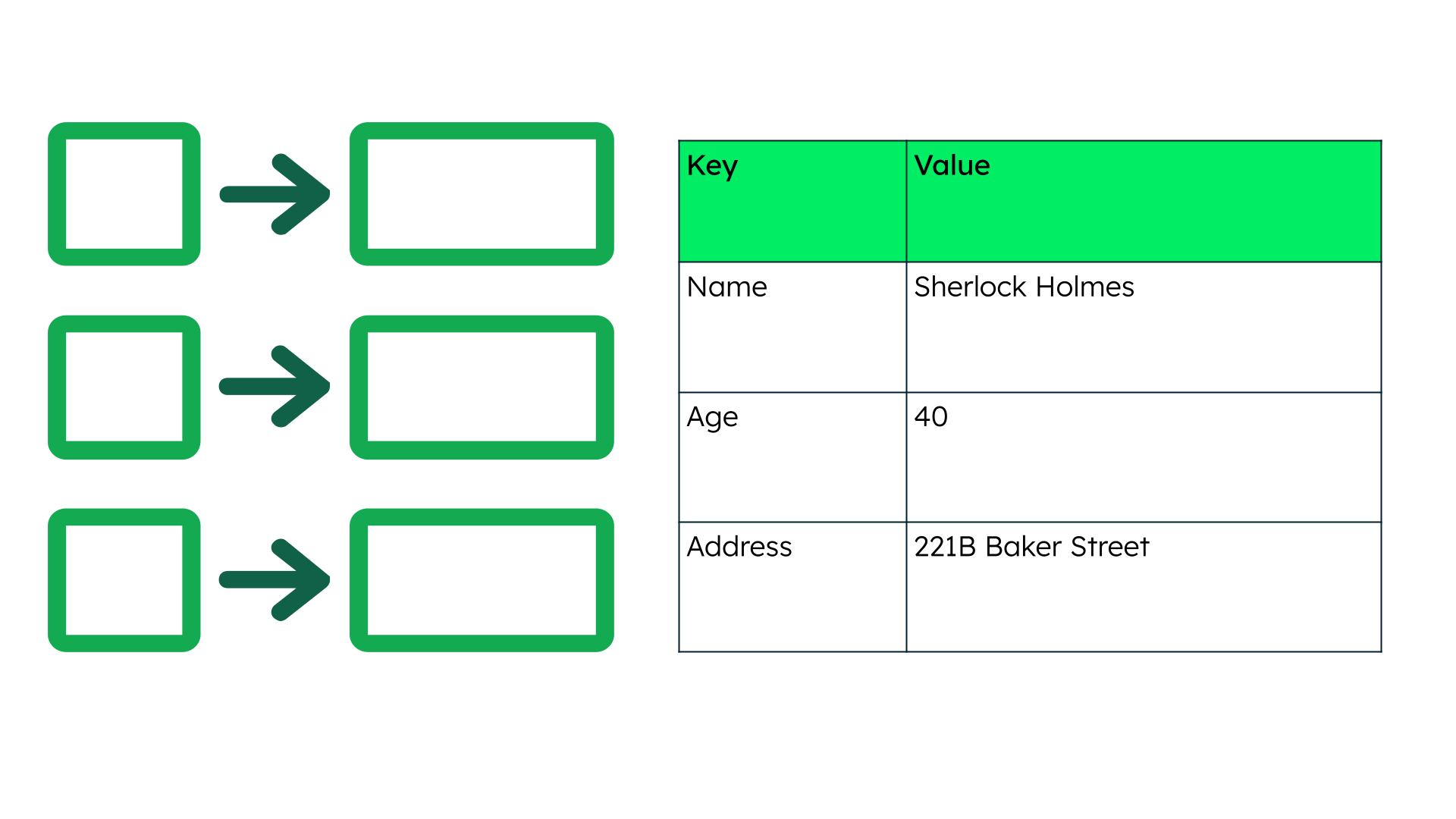
Key Value databases use a unique key (any value in the database) and pair it with a collection of values. Keys can be anything from a text value to binary objects made up of 1s and 0s. These databases don’t have complex queries because the key value is directly associated with the data being queried. These databases excel for large datasets but can struggle when complex relationships are required.
Graph Databases
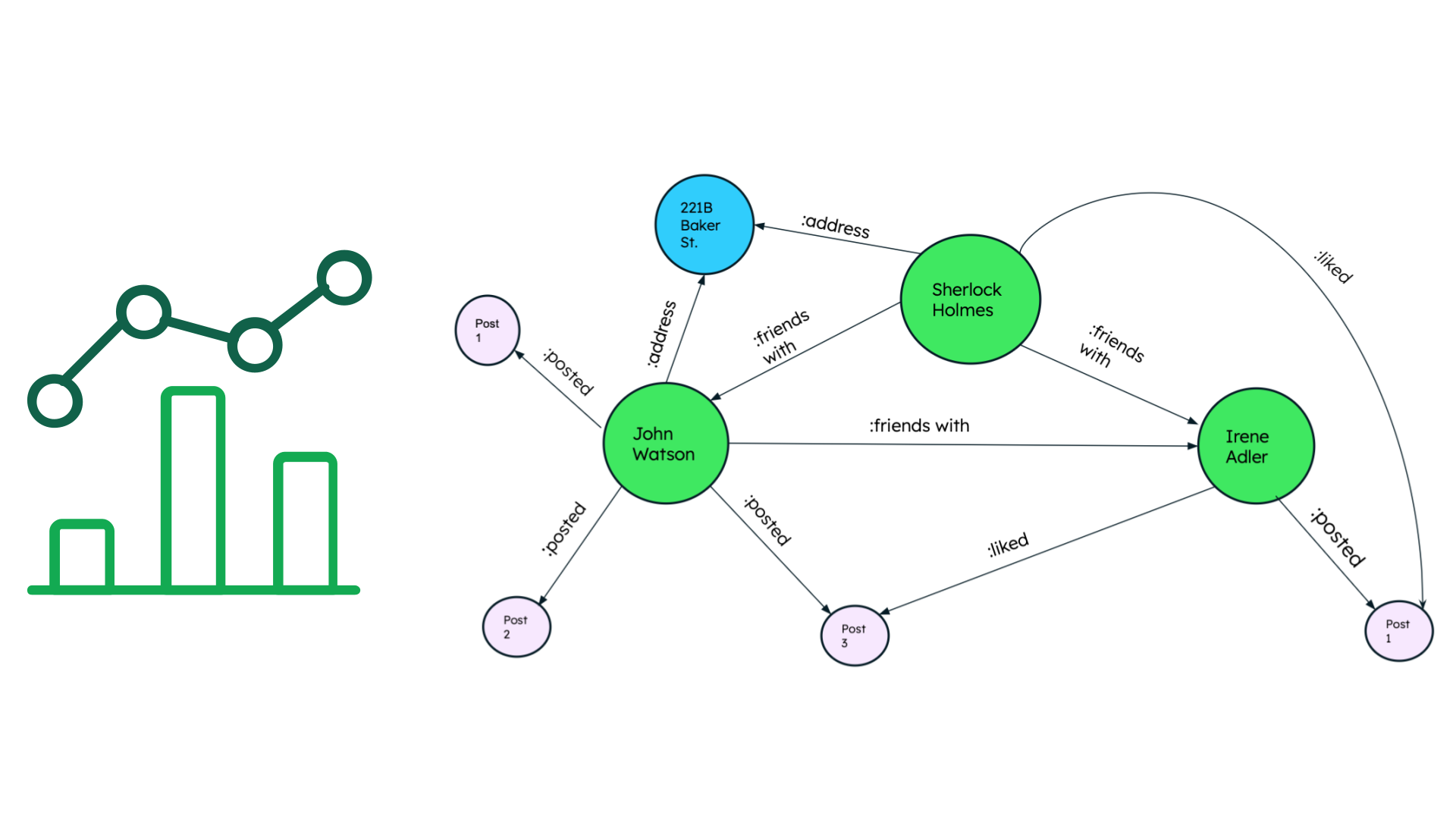
Graph databases store information as a collection of nodes and edges, with edges representing relationships between nodes. They are primarily used for applications that require an understanding of the relationships between connected data, for example social networking applications. Due to the method of storing data, they are often able to make querying more efficient than a comparable SQL database that would require data retrieval from multiple tables with joining operations. Very few real-world business systems can survive solely on graph databases. As a result, graph databases are usually run alongside more traditional databases.
Column Databases
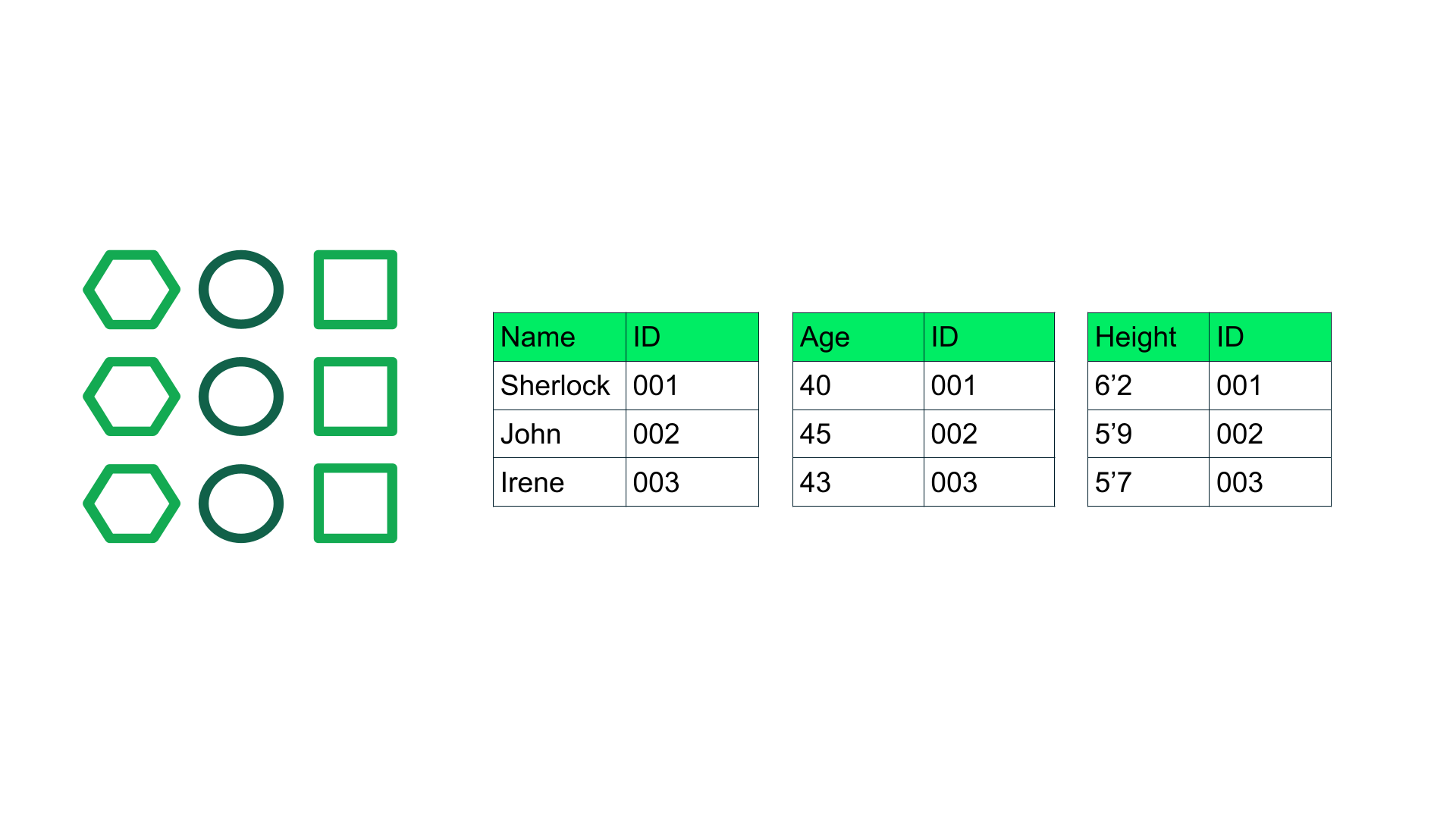
Column databases flip traditional tabular formats by using columns to store a record instead of rows. Columns are of the same data type and benefit from more efficient compression, making reads even faster. Though at first glance it might seem similar to the known relational tabular format, it is very different in that the data is sorted via column IDs. Therefore the relationships between data are identified via the column key. These databases are often used for analytical applications. When you run analytics on a small number of columns in the network, you can read those columns directly without taking up memory with unwanted data.
Document Databases
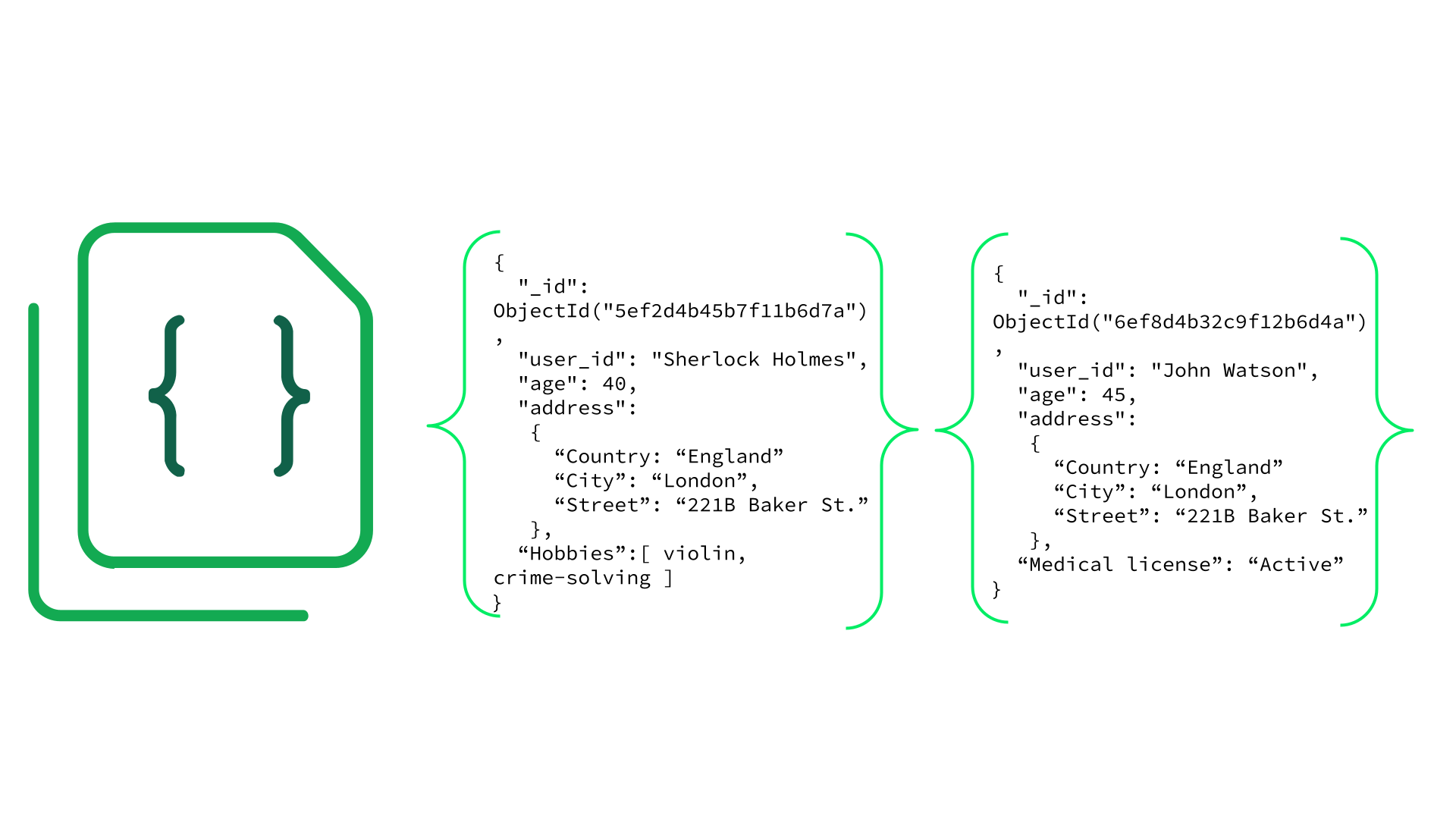
Document databases store data in a single document that lives within a collection. These documents use markup to identify fields and values within the text, making them very accommodating for data that may not always be consistent (polymorphic data). The document is a close analogy to the object in object-oriented programming and provides a clear natural representation of a ‘thing’ and its data. This also means that less translation between programming languages is required to use and access the data in an application.
Schemas and Data Modeling
One of the biggest benefits of NoSQL databases is that they offer flexibility that traditional SQL databases can not. Since they utilize different structures for storing data beyond the traditional table format, they can accommodate changes in data more easily. Let’s take a second to explore schemas in order to better understand how this works.
A schema refers to a set of rules that govern how data is stored and organized in a database. In traditional SQL databases, this means defining the fields (columns within the various tables) and expected values within. For example, if we are using a database to track inventory, we can use the schema to ensure data in the “quantity” field is numeric. We can also limit the values that can be input for item color or limit the number of characters in the “description” field.
Data modeling refers to the organization of data within a database and the links between related entities. It’s sometimes compared to a blueprint for a building. Whereas a schema dictates the rules enforced by the DBMS, a data model will lay out the relationships between data and is often visualized in a diagram. These two terms are heavily linked, but data modeling can be thought of as a concept of how the database is organized and the schema as the rules that make data conform to the data model.
We will talk more about these concepts later when we discuss the document model in more detail, but for now just know that NoSQL databases can enforce schemas. They support more flexible data structures than traditional SQL databases, ranging from minimal guidelines for rapid prototyping to strict validation rules for comprehensive governance as applications scale.
With a SQL database, updating the schema (and data model) can be difficult and potentially expensive. For example, say we want to add a new field to an existing database. We need to decide not only what table to append the new data to, but we need to decide what (if any) values to add in the new field for all the existing rows of data.
With NoSQL databases, there's no fixed table structure, so you don’t have to add the new field to every record. You can simply include it where it’s needed. This flexibility makes it much easier to handle data that changes or grows over time.
Structured, Semi-Structured, and Unstructured Data
So far we have discussed databases a lot but we haven’t really talked about data, except to say that there is a lot of it and it’s probably a good idea to store it. But not all data is the same. One common way to differentiate data is to classify it as structured, semi-structured, or unstructured.

Structured Data
This term refers to data that is highly organized (usually in a table). This type of data is predictable (meaning it sticks to a format) which makes it efficient for computers.
Semi-Structured Data
Data that is organized but doesn’t follow a strict data model will be classified as semi-structured. There is a pattern to this type of data, but it isn’t always predictable. Examples include JSON and XML.

Unstructured Data
Everything else! The majority of data available is unstructured, meaning that it hasn’t been organized or categorized. Videos, images, audio files, text documents, and anything else you find useful are considered unstructured data. This type of data is often used to fuel AI models, be it for training the models or providing context to get better responses.
Key Points to Remember
We’ve covered a lot of ground in a short time but hopefully you’ve got a good sense of what a database is and some of the key features that differentiate the many database offerings available.
- Databases: Databases store data to power applications and use a Database Management System (DBMS) to perform essential functions.
- SQL vs. NoSQL: SQL databases are based on traditional tabular formats while Not Only SQL databases were developed to offer more flexibility in working with modern data.
- Schemas: Schemas are the rules governing how data is stored and organized in the database.
There is still a lot of good information to cover that can help you take advantage of modern databases to get the most out of your instance. See you in the next section!
Note
You must view all pages and videos and pass the skill check at the end to earn this badge.