
Sharding Strategies / Training
What You'll Learn

Set Up MongoDB Sharding Architecture: Explain how MongoDB’s sharding architecture and the deployment process of a sharded cluster.
Sharding in MongoDB
MongoDB supports horizontal scaling through its sharding architecture, which distributes data and workloads across multiple servers (shards). Sharding allows your application to handle increased data volumes and traffic efficiently by distributing the load, leading to improved performance and resource utilization across the database infrastructure.
If you’re building for scale, it’s important to proactively consider sharding.
While there are many considerations when it comes to sharding, this skill badge focuses on four of the most critical:
- Understanding the sharding architecture and deploying a sharded cluster
- Partitioning collections within a sharded cluster
- Optimizing a shard key for a partitioned collection
- Modifying your sharding approach over time through resharding
These are the processes and decisions that shape how your data is distributed, how efficiently your queries run, and how well your system scales as it grows. We focus on these essentials because they have the most direct impact on the performance and flexibility of applications.
Note
This skill badge presents sharding as of MongoDB 8.0. For sharding in MongoDB 7.0 or earlier versions, please review our documentation.We’ll start with the big picture—the components of a sharded cluster and what they do—and then explore how to deploy a sharded cluster.
MongoDB Sharding Architecture: What’s Under the Hood
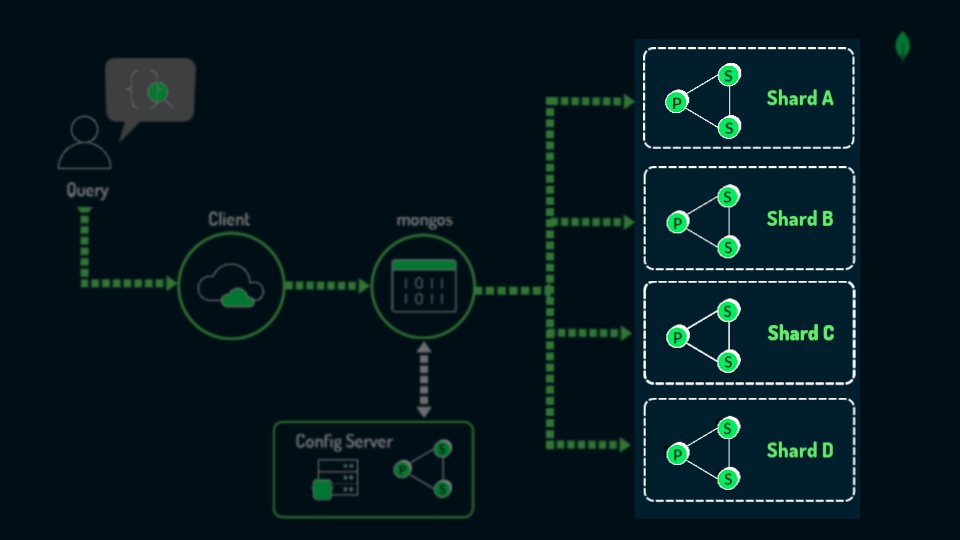
A MongoDB sharded cluster involves three main components:
mongos routers, config servers, and shards. The following diagrams show how a query flows through a sharded cluster.Each component of a sharded cluster plays a part in the flow.

Clients send query requests to
mongos routers.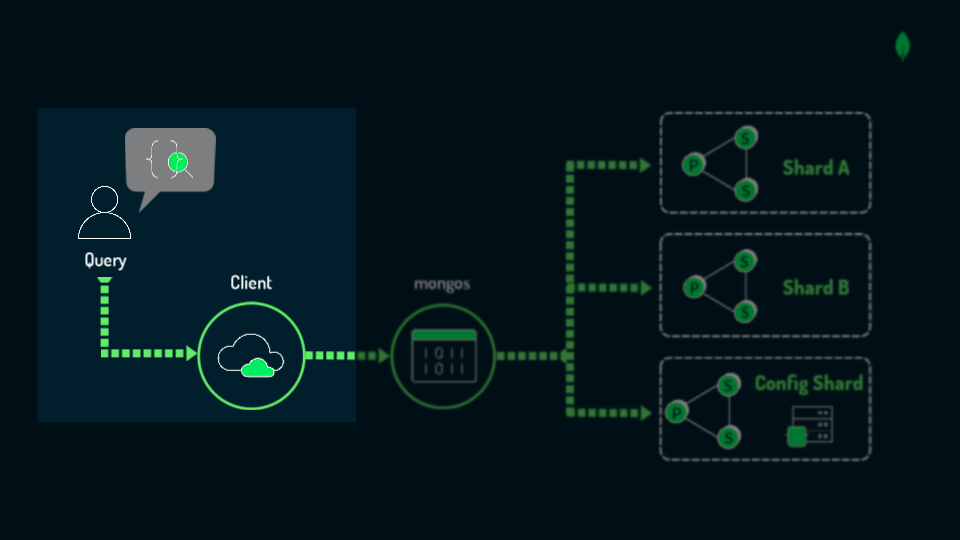
mongos routers act as an intermediary between client applications and the MongoDB shards. Applications always interact with the cluster through mongos, which accepts queries from applications and routes them to the appropriate shard based on metadata about the collection locations, data ranges on each shard, and the primary shard of each database.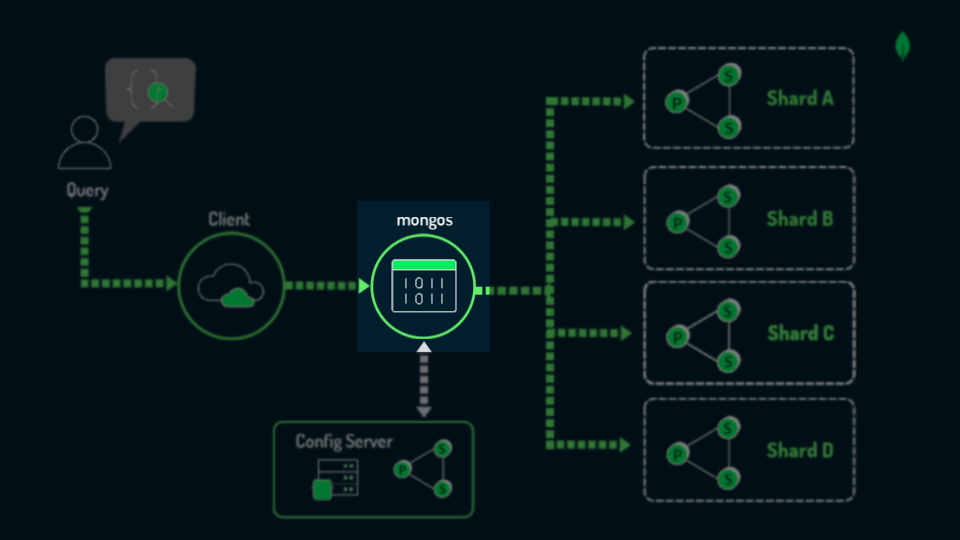
Config servers store the metadata about the sharded cluster, such as the chunk ranges and shard key definitions, which are fields that partition collections across shards in a MongoDB cluster.
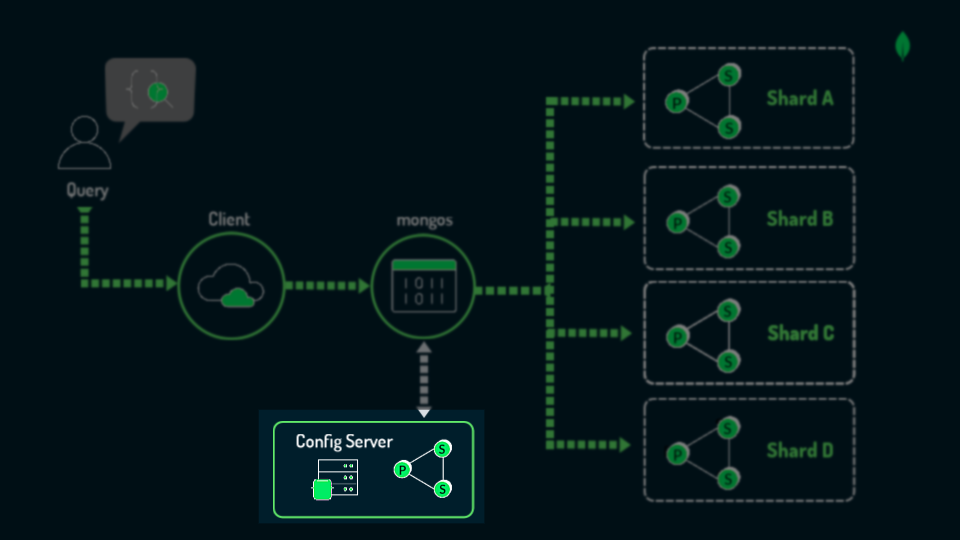
Starting in MongoDB 8.0, when you have three or fewer shards, you can use a config shard. Also known as an embedded config server, a config shard is a designated shard that contains the metadata and configuration settings crucial for the cluster's operations along with user data, which saves on costs and resources.
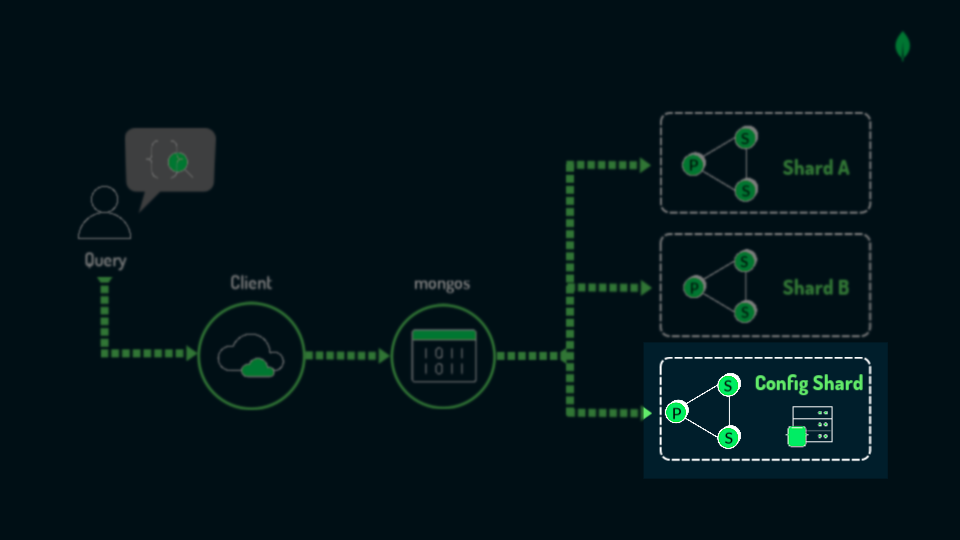
Shards store the actual data (each a replica set with a primary (P) and secondary (S) members) and contain subdivisions of this data called chunks.
In a sharded cluster, not all collections need to be sharded. Each database has a primary shard where all unsharded collections are stored by default.
Implementing Sharding
Sharding is a living architecture that supports data management and scaling, operating continuously behind the scenes to ensure optimal performance.
When setting up your sharding architecture, you'll need to make a few foundational decisions that affect how MongoDB distributes data, manages workload, and scales.
Set Up Sharding In Your Cluster
The two ways to set up sharding in your cluster are via MongoDB Atlas—a fully-managed cloud service that automates deployment and maintenance of sharded clusters—and self-managed deployment, where you manually configure and manage the infrastructure.
In the following video, we’ll walk through the steps for deploying a sharded cluster using MongoDB Atlas. Refer to our documentation to learn how to deploy a self-managed sharded cluster.
Select Play to learn more.
Press O for more options

▶ Video Transcript (English)
In this video, we’ll set up a sharded cluster via MongoDB Atlas, focusing on our example application: LeafyBank.
The LeafyBank app provides online banking services. From the start, LeafyBank anticipates they will have to scale. They start off with thousands of users. Their application becomes very popular and after a few years, they gain millions of users.
They decide it is time to shard.
Let’s walk through how LeafyBank sets up a cluster for sharding.
As a first step, we’ll open the Atlas dashboard. On the left-hand side, under your project, you’ll see the option for Clusters.
Select “Create.”
For the tier, we’ll need to select an M30 or higher. The M30 tier is the minimum for deploying a sharded cluster in MongoDB Atlas.
We’ll name the cluster LeafyBank, and then move on to the Advanced Configurations page.
Here, under Additional Settings, we’ll toggle the “Shard Your Cluster” option.
Next, we’ll select the number of shards.
The number of shards and tier size we select will directly impact the workload our cluster will be able to handle.
So, how do we determine how many shards to deploy?
The more shards we have, the more distributed our data will be. This allows us to handle larger datasets and greater read and write throughput by balancing the load across multiple machines.
However, more shards also introduce additional complexity, as we’ll need to maintain more hardware resources and keep track of data distribution.
For simplicity, it is recommended to start with a single-shard cluster for new applications. Consider adding more shards when resource utilization reaches 60-70%.
We need to find the optimal number of shards for our use case.
Let’s say that LeafyBank chooses 1 shard to start, knowing they can add more shards later. So here we’ll select 1 shard.
You’ll notice that with just 1 shard. Atlas will automatically set up a config shard, or embedded config server, for you. This saves on costs and resources.
When we select Create Cluster, Atlas automatically sets up the shard, config server, mongos instance, and other infrastructure needed for sharding except for the shard key.
With that, LeafyBank officially has a sharded cluster!
The LeafyBank app provides online banking services. From the start, LeafyBank anticipates they will have to scale. They start off with thousands of users. Their application becomes very popular and after a few years, they gain millions of users.
They decide it is time to shard.
Let’s walk through how LeafyBank sets up a cluster for sharding.
As a first step, we’ll open the Atlas dashboard. On the left-hand side, under your project, you’ll see the option for Clusters.
Select “Create.”
For the tier, we’ll need to select an M30 or higher. The M30 tier is the minimum for deploying a sharded cluster in MongoDB Atlas.
We’ll name the cluster LeafyBank, and then move on to the Advanced Configurations page.
Here, under Additional Settings, we’ll toggle the “Shard Your Cluster” option.
Next, we’ll select the number of shards.
The number of shards and tier size we select will directly impact the workload our cluster will be able to handle.
So, how do we determine how many shards to deploy?
The more shards we have, the more distributed our data will be. This allows us to handle larger datasets and greater read and write throughput by balancing the load across multiple machines.
However, more shards also introduce additional complexity, as we’ll need to maintain more hardware resources and keep track of data distribution.
For simplicity, it is recommended to start with a single-shard cluster for new applications. Consider adding more shards when resource utilization reaches 60-70%.
We need to find the optimal number of shards for our use case.
Let’s say that LeafyBank chooses 1 shard to start, knowing they can add more shards later. So here we’ll select 1 shard.
You’ll notice that with just 1 shard. Atlas will automatically set up a config shard, or embedded config server, for you. This saves on costs and resources.
When we select Create Cluster, Atlas automatically sets up the shard, config server, mongos instance, and other infrastructure needed for sharding except for the shard key.
With that, LeafyBank officially has a sharded cluster!
Key Points to Remember
Well done! You now know sharding architecture in MongoDB and how to deploy a sharded cluster. Here are some key points to remember:
- Sharded Cluster Architecture: Shards store data,
mongossends queries, and config servers keep metadata. - Deployment: Use MongoDB Atlas for an easier setup or set up manually for more control.
- When to Add Shards: Consider adding more shards when resource utilization reaches 60-70%.
Next, we’ll explore how to partition a collection across shards.
Select Next to continue.